Amazon Connect - Call Authentication
Introduction
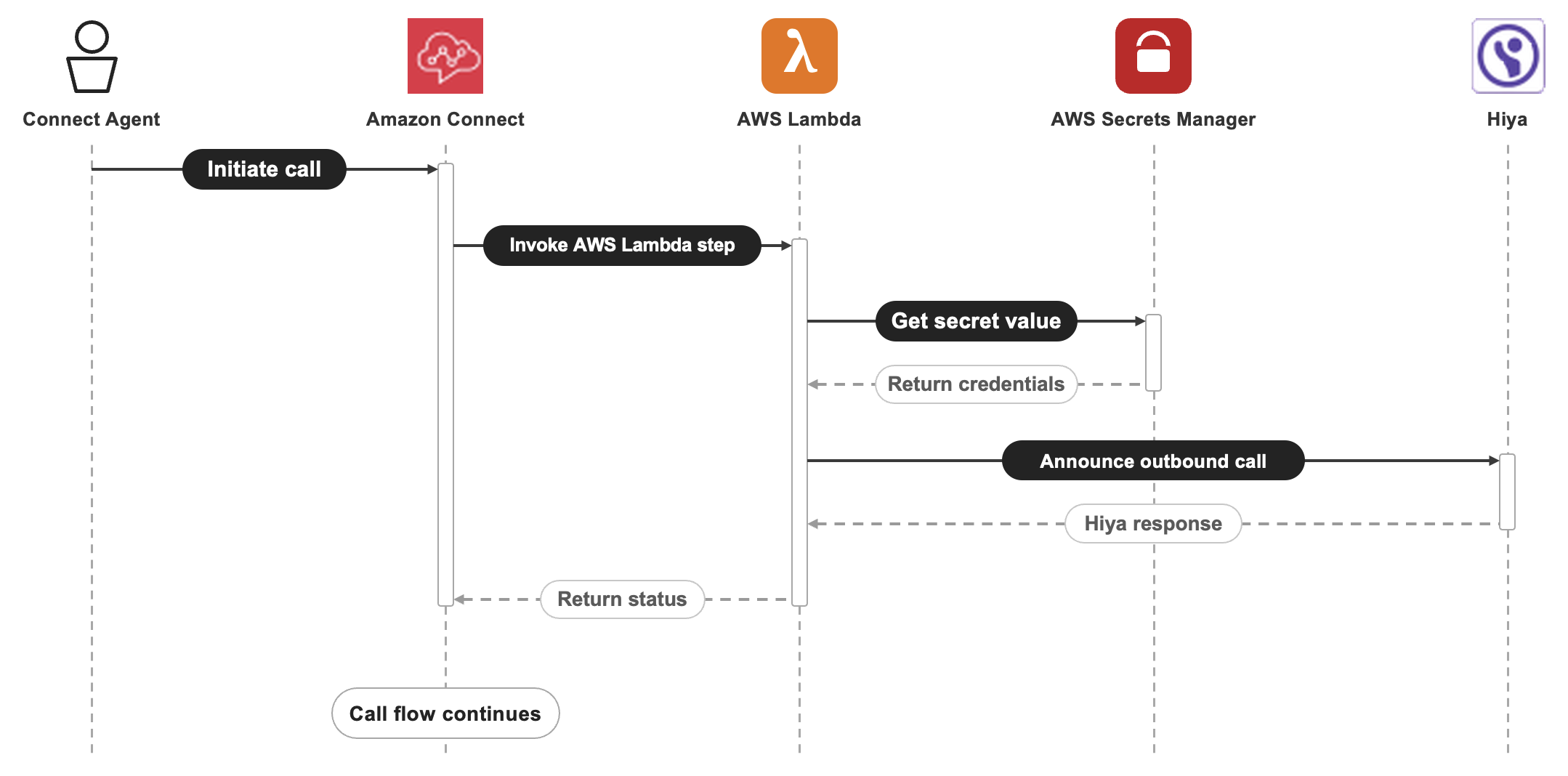
This document describes the integration between Amazon Connect and Hiya Secure Branding to provide branded outbound call experiences. The integration ensures that before each outbound call, Amazon Connect invokes a Lambda function, which communicates with the Hiya Secure Branding API to register the call details.
High-level workflow:
- Amazon Connect invokes an AWS Lambda at the start of the Outbound Whisper Flow, before the "Call Phone Number" block, at the start of each outbound call.
- The Lambda function retrieves API credentials and company information from AWS Secrets Manager.
- Lambda constructs and sends a request to the Hiya Secure Branding REST API.
Prerequisites
- Access to Hiya Connect Portal.
- Vetted and approved business.
- Hiya Secure Branding API credentials (
app-id,app-secret, andbusiness-id). - An operational Amazon Connect instance, and ability to originate phone calls from it.
- Outbound call flow customization permissions in Connect.
Setting up Hiya Connect Portal
Check out this guide to learn how to set up your Hiya Connect Portal for secure branded calling, and how to get access to API keys: Secure Your Branded Call from Spoofers
Storing API Credentials in AWS Secrets Manager
The Hiya Secure Branding API requires authentication using credentials issued by Hiya.
These should be securely stored in AWS Secrets Manager.
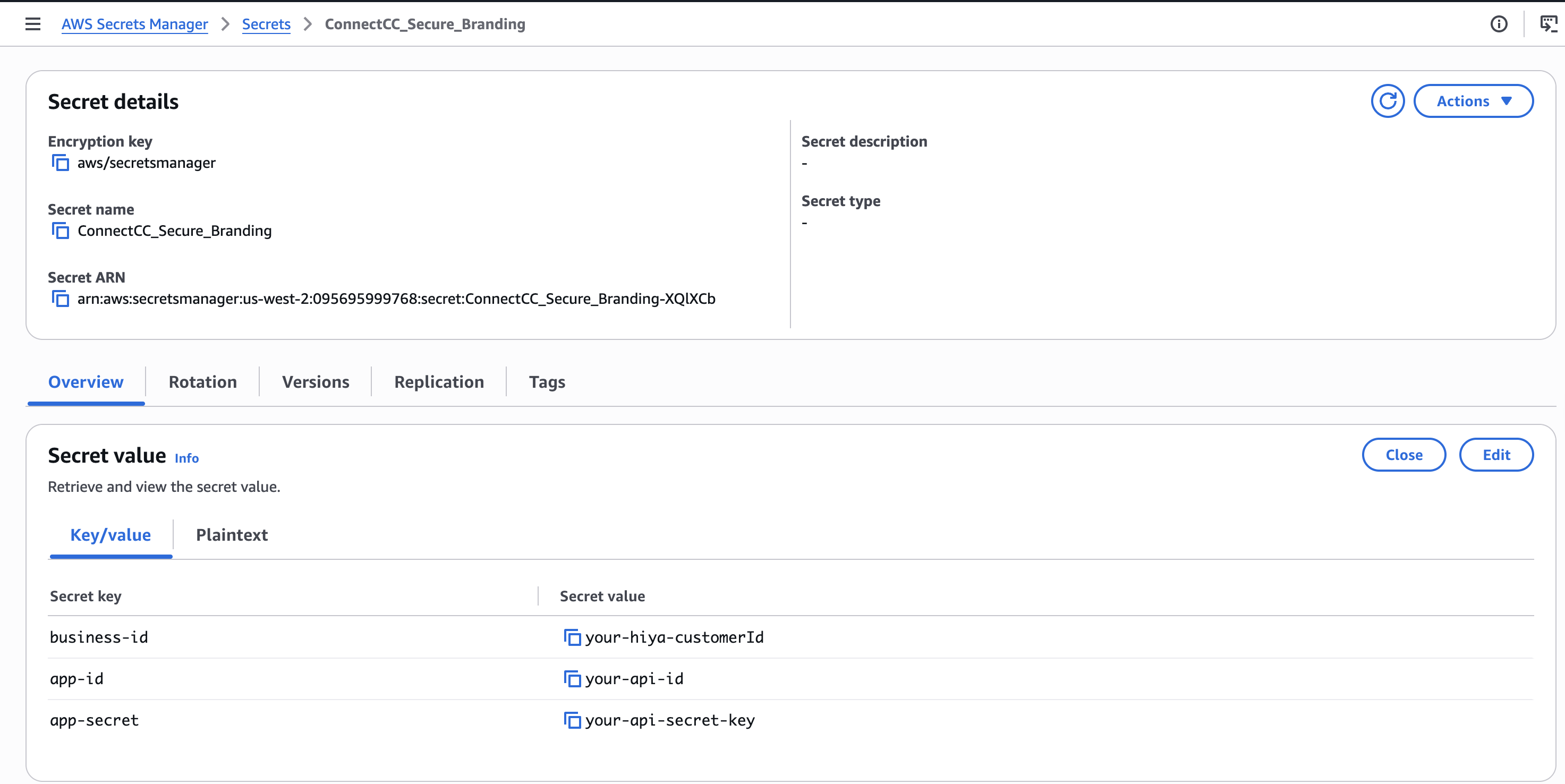
Store the following keys in a single secret (e.g. ConnectCC_Secure_Branding):
| Secret key | Maps to API field | Example |
|---|---|---|
business-id | customerId | 8fcf...234 |
app-id | username portion of auth | PROD_24b...J7m |
app-secret | password portion of auth | z4b...UA |
customerId is the unique ID assigned to a business in the Hiya Connect Portal.
Configuring the AWS Lambda Function
The Lambda function is responsible for:
- Retrieving credentials and company details from Secrets Manager.
- Building the request body with call metadata.
- Authenticating and calling the Hiya API.
- Handling failures without exceeding timeout. If Hiya is unreachable, the call proceeds rather than being blocked
Dependencies
This function is written in Node.js and makes use of the following dependency:
@aws-sdk/client-secrets-manager(AWS SDK for JavaScript v3) — the v2aws-sdkpackage used in earlier drafts of this guide is on AWS's deprecation path for Lambda managed runtimes; new integrations should use the modular v3 client.axios: https://www.npmjs.com/package/axios
Note: These dependencies must be included in the Lambda deployment package. They are not bundled automatically when using inline editor deployments. For production, build a deployment package or use AWS SAM/Serverless Framework/Lambda Layers to package the function together with these libraries.
Example Lambda Implementation
Below is a reference implementation.
// index.mjs — Node.js 20.x, ESM
import axios from "axios";
import {
  SecretsManagerClient,
  GetSecretValueCommand,
} from "@aws-sdk/client-secrets-manager";

// Hiya Secure Branding API — outbound call registration endpoint.
const HIYA_API_ENDPOINT = "https://api.hiyaapi.com/v1/originators";

// Name of the Secrets Manager secret holding app-id, app-secret, and business-id.
const SECRET_NAME = process.env.HIYA_SECRET_NAME || "ConnectCC_Secure_Branding";

// How long Hiya should treat this call's branding info as valid.
const TIME_TO_LIVE_SECONDS = 15;

const smClient = new SecretsManagerClient({});

// Cache the secret across warm Lambda invocations so repeat calls skip the Secrets Manager round trip.
let cachedSecret;

async function getSecret() {
  if (cachedSecret) return cachedSecret;

  const resp = await smClient.send(
    new GetSecretValueCommand({ SecretId: SECRET_NAME })
  );
  cachedSecret = JSON.parse(resp.SecretString);
  return cachedSecret;
}

export const handler = async (event) => {
  // Amazon Connect passes call metadata to the Lambda under event.Details.ContactData.
  // SystemEndpoint = Connect's outbound number; CustomerEndpoint = the number being called.
  const originatingPhone = event.Details.ContactData.SystemEndpoint?.Address;
  const terminatingPhone = event.Details.ContactData.CustomerEndpoint?.Address;
  const callReason = event.Details.Parameters?.callReason;

  try {
    // 1. Retrieve Hiya credentials from Secrets Manager.
    const secret = await getSecret();

    // 2. Build the Basic Auth header: base64("app-id:app-secret").
    const authHeader =
      "Basic " +
      Buffer.from(`${secret["app-id"]}:${secret["app-secret"]}`).toString("base64");

    // 3. Build the request payload from Connect's call metadata plus the
    //    account's business-id (mapped to Hiya's customerId field).
    const payload = {
      customerId: secret["business-id"],
      originatingPhone,
      terminatingPhone,
      timeToLiveSeconds: TIME_TO_LIVE_SECONDS,
      ...(callReason && { callReason }),
    };

    // 4. Announce the call to Hiya
    const response = await axios.post(HIYA_API_ENDPOINT, payload, {
      headers: { Authorization: authHeader, "Content-Type": "application/json" },
      timeout: 5000,
    });

    // 5. Success — the call flow can proceed to place the outbound call.
    return { status: "REGISTERED", httpStatus: response.status };
  } catch (err) {
    // 6. If Hiya is unreachable or returns an error,
    //    the call proceeds unbranded rather than being blocked (fail-open).
    console.error("Hiya registration failed:", err.message);
    return { status: "FAILED_OPEN", error: err.message };
  }
};
Request Body to Hiya API
The Lambda constructs the request payload with the following parameters:
| Parameter | Required | Format | Description |
|---|---|---|---|
customerId | Yes | string | Unique identifier for the calling company (from business-id secret). |
terminatingPhone | Yes | E.164, e.g. +14155551234 | Customer phone number being called. |
timeToLiveSeconds | Yes | integer | Expiration time for call branding info. |
originatingPhone | Yes | E.164 | Caller phone number (Connect's outbound number). |
callReason | Optional | string | Displayed reason for the call. Check Hiya's Call Reason guidelines for length/content restrictions. |
For detailed explanation, see the current Hiya API reference for the outbound call registration endpoint: Pre-announce Outbound Calls
Creating the Lambda Function
The code and permissions above assume the function already exists. Here's how to actually create and deploy it.
1. Package the deployment artifact
Since axios and @aws-sdk/client-secrets-manager aren't bundled by the inline console editor, build the deployment package locally:
mkdir hiya-secure-branding && cd hiya-secure-branding
npm init -y
npm install axios @aws-sdk/client-secrets-manager
# save the handler code above as index.mjs in this folder
zip -r function.zip index.mjs node_modules package.json
2. Create the IAM execution role
Before creating the function, create the role it will run as. Attach a policy allowing:
secretsmanager:GetSecretValue, scoped to the specific secret's ARN (not a wildcard resource).- CloudWatch logging permissions (
logs:CreateLogGroup,logs:CreateLogStream,logs:PutLogEvents).
3. Create the function
In the Lambda console: Create function → Author from scratch.
- Function name: e.g.
ConnectCC_Outbound_Hiya - Runtime: Node.js 20.x
- Architecture: x86_64 (or arm64, if your build targets it)
- Permissions: choose "Use an existing role" and select the role created in step 2.
4. Upload the code
Under Code source, choose Upload from → .zip file and upload function.zip from step 1. Set the Handler to index.handler — Lambda resolves this against index.mjs's exported handler function regardless of the .mjs extension.
5. Set environment variables
Under Configuration → Environment variables, add:
| Key | Value |
|---|---|
HIYA_SECRET_NAME | The name of your Secrets Manager secret (e.g. ConnectCC_Secure_Branding) |
6. Set the function timeout
Under Configuration → General configuration, set Timeout to a small value — 5 seconds is a reasonable ceiling, well clear of Connect's 8-second hard limit but generous relative to the 2–3 second axios timeout in the code. Don't default this to the maximum; see the note on Connect's 8-second ceiling under Integrating with Amazon Connect Call Flow.
7. Grant Amazon Connect permission to invoke it
This is separate from the execution role above — it controls who's allowed to call the function, not what the function itself can access. In the Amazon Connect console, go to your instance → Flows tab → add the function under Lambda functions. This automatically adds the required resource-based policy to the Lambda allowing your Connect instance to invoke it.
8. Test before wiring it into a call flow
Use the Lambda console's Test tab with an event shaped like what Connect sends, so you can confirm the function runs end-to-end before it's live on a real outbound call:
{
  "Details": {
    "ContactData": {
      "SystemEndpoint": { "Address": "+14155559999" },
      "CustomerEndpoint": { "Address": "+14155551234" }
    },
    "Parameters": {
      "callReason": "Appointment reminder"
    }
  }
}
A successful test should return {"status": "REGISTERED", "httpStatus": 200} (or FAILED_OPEN with an error message if your Hiya credentials aren't reachable from this environment yet).
Integrating with Amazon Connect Call Flow
To ensure that every outbound call triggers the Hiya API, modify your Connect Outbound Whisper Flow:
- Open your Amazon Connect instance in the AWS console.
- Edit the outbound whisper flow used for your outbound campaigns (or create a new one) — this is distinct from the main contact flow.
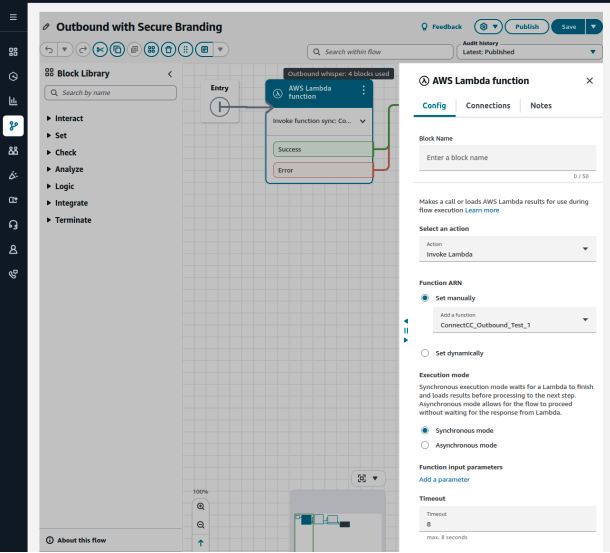
- At the start of the flow, add an "AWS Lambda function" block positioned before the "Call Phone Number" block, so branding registration completes before the call is placed.
- Select the Lambda function created earlier.
- Set invocation to Synchronous mode. Set the Lambda's own timeout to a small value — a few seconds at most — rather than approaching Connect's maximum.